The problem
Four networks solving the same problem four different ways.
Part Shops Canada makes money from ads on its WordPress sites, sourced through . An lists its ads in a network. A , which is what Part Shops is, pulls those ads through the network’s API and shows them on its sites. When a visitor clicks one and buys, the publisher earns a commission, and the network sits in the middle tracking the clicks and the money.
The job was to pull from four networks, FlexOffers, Awin, CJ and Impact, and get them onto WordPress. The catch is that all four solve the same problem with completely different APIs: different auth, different data formats (CJ speaks , the others ), different , and different quirks. The whole system exists to hide that four-way inconsistency behind one clean internal shape.
I worked on two areas. I built the CJ and Impact integrations: the API clients, the parsers, and the that translate each network into the common ad model. And I built the export engine, the other end of the system, which turns more than 11,000 synced ads into a CSV that can import directly, including third-party HTML that arrives in inconsistent states.
The system
A Python sync on one side, a Laravel dashboard on the other.
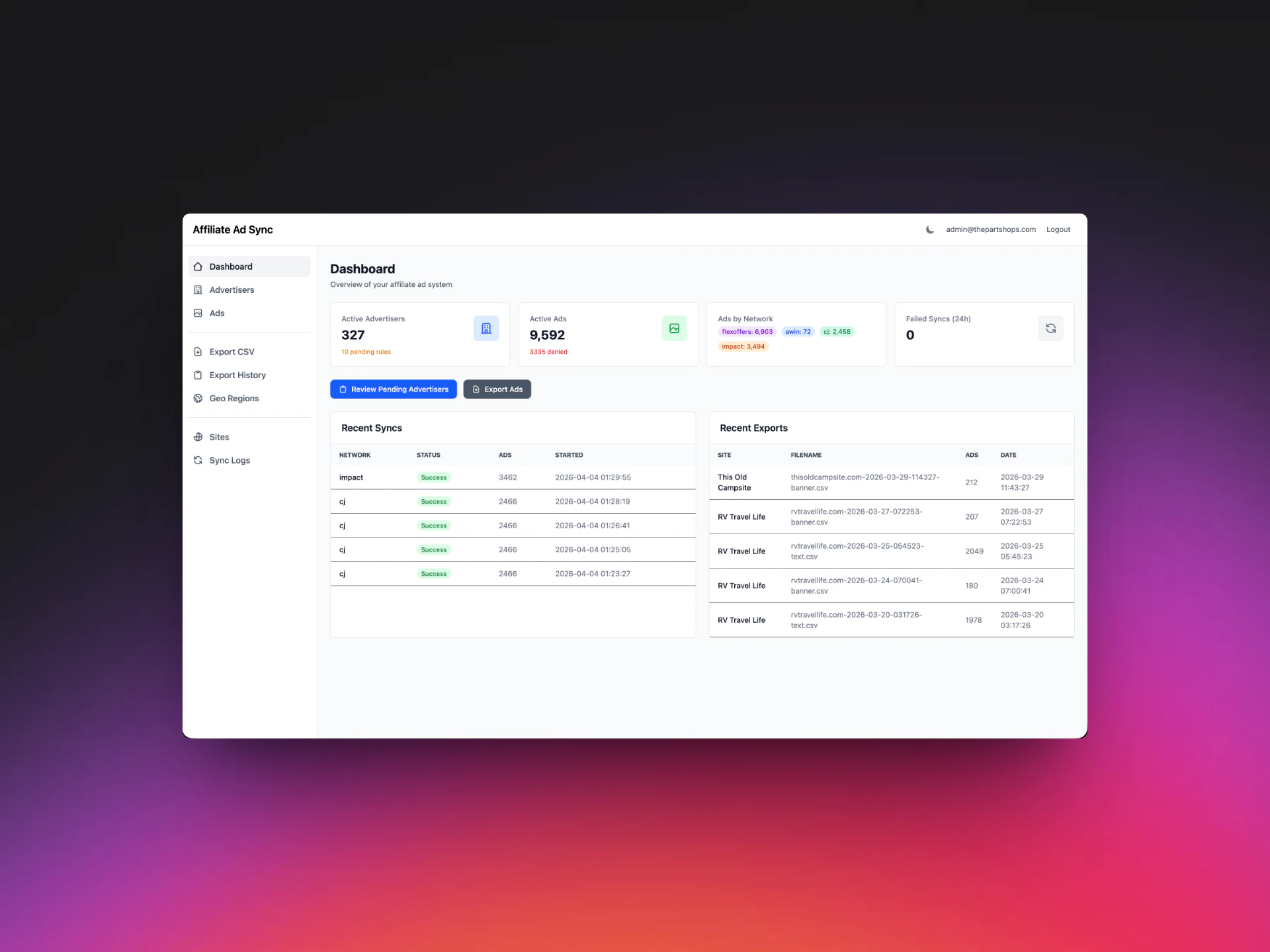
There are two halves. A Python sync service talks to the networks on a schedule and everything into one in . A admin dashboard is where an operator filters that catalog and generates export files for .
One run, end to end
From a cron trigger to an auditable log row.
The sync runs daily through on a schedule, against a remote MySQL database on . There’s no server sitting idle: the workflow starts, syncs every network, and exits.
- 1
Trigger
GitHub Actions cron fires daily. No server stays running: the workflow spins up, syncs against the remote MySQL database, and exits.
- 2
Set up
main.py opens one database connection and builds the four network clients. Each knows its own auth and quirks but exposes the same sync() interface.
- 3
Loop networkssteps 4 to 8 repeat per network
Each client.sync() runs inside its own try/except, so one network failing is logged and the loop moves on.
- 4
Fetch advertisers
Paginate until the API says there are no more, mapping each into the shared schema.
- 5
Fetch ads
Same pattern for ads. Network-specific shaping, like CJ’s XML flattening or Impact’s grouping, happens here.
- 6
Change detection
Fingerprint each mapped record and compare with the stored one. Unchanged records skip the write.
- 7
Upsert
Insert or update, keyed on the network’s stable ad id, each record wrapped so a bad one is skipped.
- 8
Reconcile
Anything stored for this network that the API didn’t return is stale: ads are deleted, advertisers deactivated.
- 9
Log
Write a sync_logs row with counts, timing and per-record errors, so every run can be audited afterwards.
Change detection
Most records don’t change between runs, so most writes shouldn’t happen.
For each mapped record, the pipeline checks whether it already has it, computes a fingerprint of its content, and compares that with the stored fingerprint. Unchanged records skip the write entirely.
The fingerprint comes from a , which turns any input into a fixed-length string. Identical input always produces the identical fingerprint, and changing even one character changes it completely. The pipeline uses .
There’s a trap. A hash only works for this if fields go in the same order and format every time. If a network returns the same fields in a different order, a naive hash sees different input and reports a false change. So the hash is built from a of the record, not from whatever order the API happened to return.
- of records skipped on a real daily run
- 97.8%
- written out of 11,000, the rest untouched
- 240
The skip rate held across multiple daily syncs.
Upserts and cleanup
Safe to rerun, and nothing stale left behind.
New or changed records are written with an : one operation that inserts a row if it doesn’t exist and updates it if it does. That makes the write . A cron job that dies halfway and reruns can’t create duplicate ads, because the second run just re-updates rows to the same values.
The database doesn’t magically know whether an ad is new. The network’s stable ad identifier is declared with a , and INSERT … ON DUPLICATE KEY UPDATE reacts to it. If no row has that key, the insert succeeds. If one does, the insert conflicts, and instead of erroring the database runs the update on the existing row. It’s the same identifier change detection uses: the one stable handle for “the same ad across syncs.”
Each record’s upsert runs inside its own error boundary. Processing 15,000 records in one loop, a naive version that hits a bad record at number 4,000 crashes and loses the remaining 11,000. Here a failure is logged and the loop moves on.
After a full pass for a network comes reconciliation. Anything still in the database that the network no longer returns is stale, because the advertiser pulled it. Stale ads are deleted. Advertisers that vanished are : flagged inactive, with the row kept, so historical references don’t break.
Impact integration
Making the request count independent of campaign count.
Impact’s documented way to fetch ads is per campaign: one call for each. With 68 campaigns that’s 68 requests, and it grows linearly with every campaign added. It doesn’t scale, and it burns through the fast.
So I replaced it with one bulk fetch over Impact’s global /Ads endpoint, paging 100 ads at a time by following the @nextpageuri field until there’s no next page. The results go into one flat list and get grouped in memory by campaign with a . The request count is now driven by total ad volume in fixed pages, not by how many campaigns exist.
A run goes: fetch every ad globally, filter to English (Impact sends every , and the drop count is logged), group by campaign, fetch campaigns and keep only those whose ContractStatus is Active, then map each active campaign’s ads into the common model and hand them to the shared change detection and upsert path.
- ads per run
- 3,260+
- campaigns
- 68
- per run, 38 to 41s across ten logged runs
- ~40s
CJ integration
Flattening XML without mangling the ads inside it.
CJ returns XML, a tree of nested tags. JSON maps to a dictionary in one line, but XML you have to walk yourself, and the database wants flat columns, not a tree. So each page is requested with language=en at 100 records, and ’s ET.fromstring turns the reply into a tree of elements, each with a tag, a text value, attributes and children. Every ad is then flattened into a field-to-value dictionary.
The flattener, _element_to_dict, looks at each element’s children and sorts it into one of three shapes. No children means it’s a value, stored directly. Children that all share a tag are a repeated set, collected into a list. Children with different tags are distinct sub-fields, each flattened into a compound key like size-w and size-h, so the nested value stays addressable.
xml from cj
<link><advertiser-name>Northline</advertiser-name><seven-day-epc>N/A</seven-day-epc><categories><category>RV</category><category>Camping</category></categories><creative><width>300</width><height>250</height></creative><link-code-html><a href="…"><img src="…"/></a></link-code-html></link>
flat dict for the mapper
The parsing is defensive too. CJ puts “N/A” in numeric fields instead of null, so the seven-day parser returns 0.0 for “N/A”, empty values, or anything unparseable. When an ad has no explicit image URL, a pulls one out of the creative’s HTML as a fallback.
Pagination is driven by the total-matched attribute on the response wrapper: it stops on a short page or once pages × page size reaches the total. Each page retries on failure, with partial results kept, so one bad page doesn’t abort the sync. The development snapshot held 2,255 ads from 30 advertisers.
The export engine
From an 11,000-ad catalog to a file WordPress can import.
The other end of the system turns the synced catalog into something the sites can use. AdRotate Professional only imports ads from a in its exact column format, so an operator filters the catalog in the Laravel dashboard, clicks export, and gets a file that imports straight into WordPress with no manual reformatting.
The engine loads the matching ads, opens a download response, and for each ad maps its fields to AdRotate’s columns, cleans the creative, and writes one line. That per-ad step is : an ad object in, one CSV line out, in AdRotate’s column order. Advertiser HTML is untrusted and arrives in inconsistent states, so each creative is sanitised before it’s written, so it can’t break the CSV or the site.
the white line is the first byte the operator receives
The feature I’m proudest of came later. I watched operators generate empty exports with no idea why: their filters had quietly excluded everything. So I added a diagnostics mode that explains its own output, showing how many ads survive each filter stage so an empty or tiny export points straight at the filter responsible.
The export has eight feature tests behind it. The 11,000+ figure is the row count of a full export: CSV lines minus the header.
The ad-grid index
Filtering 12,000 ads without reading all 12,000.
The ad grid is the dashboard page where operators browse and filter ads by network, advertiser and active status. It’s separate from the export; the two belong together only because both were my work on the dashboard side.
There was no on those columns, so every filter was a . The table is stored in order of each ad’s ID, which has nothing to do with network or advertiser, so the database had to walk all of roughly 12,000 rows and check each one. Most of those checks were wasted.
The fix is a on (network, advertiser_id, is_active), stored as a : sorted by network, then by advertiser within each network, then by active status. Before running a query, the sees the index and chooses it. It follows the branches toward “CJ, advertiser 3, active”, lands where the matches begin, and because everything is sorted, reads along until they stop. The index only holds those three columns plus the ID, so each match’s ID fetches the full row for the grid.
The column order matters. Operators narrow by network first, then advertiser, and the active flag is an equality check that fits cleanly at the end. A composite index only helps queries that use its leading columns, the , so filtering by advertiser alone wouldn’t use it.
| where … | uses the index |
|---|---|
| network = 'cj' | ✓ leading column |
| network = 'cj' AND advertiser_id = 3 | ✓ first two, in order |
| network = 'cj' AND advertiser_id = 3 AND is_active = 1 | ✓ the ad grid's filter |
| advertiser_id = 3 | ✗ skips the leading column |
| is_active = 1 | ✗ skips the first two |
- ad-grid query, about 4× faster
- 18.6 → 4.3ms
- rows in the development database it was measured on
- ~12,000
What I learned
Design for scale and correctness up front, not as patches. With Impact, that meant a fetch strategy that stays flat as campaigns grow. With CJ, it meant catching that a naive parse would quietly corrupt ad creatives before it shipped. With the export, it meant streaming so the file never sits whole in memory, and being straight about the part that still doesn’t.
Build for the operator, not just for myself. The diagnostics mode was the first thing I’ve built whose entire purpose was to make a system legible to someone else.
What I’d change
Chunk the export query. Streaming only covers the output. Reading the ads in batches with chunk() or cursor() would make memory flat end to end. Streaming the output was half of it; a is the other half.
Build the diagnostics first. The export funnel exists because operators hit a wall. Making the pipeline explain itself from version one would have saved everyone that time.
Measure what change detection saves. The logs record how many records synced, but not how many were skipped versus written, even though the write step already knows and throws it away. Logging it would turn the value of change detection from something I describe into something every run reports.
Enforce rate limits in code. The networks’ limits are respected by how the fetching is shaped, not enforced. I’d add real .
Stack
| Sync service | Python, httpx, PyMySQL, ElementTree |
|---|---|
| Scheduling | GitHub Actions (daily cron) |
| Database | MySQL on cPanel, with a composite index for the ad grid |
| Dashboard and export | Laravel 11, Livewire, Tailwind CSS |
| Delivery | AdRotate Professional on WordPress |